Working with an agent
The move to ZenCad 2 was driven by a desire to make the system easier for an AI agent to use.
The API changes mainly address the principle of least surprise, which is particularly important for agent-written code. In particular, the type system now follows more familiar conventions, and lazy evaluation has a more systematic contract.
The automation tools inspect, check and render let an agent complete a modeling and debugging cycle without leaving the terminal.
One verifiable cycle
Save a plate with a hole as model.py:
from zencad import *

plate = box(20, 10, 4)
hole = cylinder(2, 4).translate(10, 5, 0)
body = (plate - hole).solids().only()
display(body, name="plate")
show()
The agent can request a report and check specific requirements:
zencad inspect model.py --json
zencad check model.py --valid --solid --volume 749:751 --bbox-size 19.99:20.01,9.99:10.01,3.99:4.01 --json
zencad inspect model.py --tree --no-cache
The model's volume is approximately 749.735, and its dimensions are 20 × 10 × 4. The check should exit with code 0. Increasing the hole radius to 3 still produces a valid solid, but the volume check exits with code 7: the model no longer meets the requirement. This gives the agent feedback for its next edit.
For a visual check, generate several views:
zencad render model.py -o views.png --views iso,front,top --size 640x480
Diagnostics and further iterations
If construction fails, zencad inspect model.py --tree --failed-path helps narrow down the cause. For debugging, select immediate evaluation and disable the disk cache; for repeated work, the cache can reuse saved results. These settings are independent—see Evaluation and caching.
Geometric selectors express what to select, such as an edge direction or face position, rather than assuming an order. Geometry validation returns structured error information.
Command options, report formats and execution limits are covered in Automation: inspect, check, render.
Can an agent code in 3D?
You bet. Here is an example:
antique_column.py:
#!/usr/bin/env python3
"""A small Ionic-inspired column modelled entirely with ZenCad."""

import math

from zencad import *


def fluted_shaft(
    bottom_radius=21,
    top_radius=18,
    height=122,
    flute_count=20,
    flute_radius=2.25,
):
    """Make a gently tapered shaft with shallow, tapered flutes."""
    shaft = cone(r1=bottom_radius, r2=top_radius, h=height)

    # The cutters follow the taper of the shaft.  Leaving a small uncut band at
    # either end makes the transition into the base and capital more legible.
    cutters = []
    margin = 4
    depth = 0.65
    for index in range(flute_count):
        angle = 2 * math.pi * index / flute_count
        c, s = math.cos(angle), math.sin(angle)

        lower_distance = bottom_radius + flute_radius - depth
        upper_distance = top_radius + flute_radius - depth
        lower = circle(r=flute_radius, wire=True).translate(
            lower_distance * c,
            lower_distance * s,
            margin,
        )
        upper = circle(r=flute_radius, wire=True).translate(
            upper_distance * c,
            upper_distance * s,
            height - margin,
        )
        cutters.append(loft([lower, upper]))

    return shaft - union(cutters)


def ionic_capital(z):
    """Build an abstracted Ionic capital with four visible scroll ends."""
    parts = [
        cylinder(r=19.5, h=4).up(z),
        torus(r1=18.6, r2=2.2).up(z + 4),
        cone(r1=20, r2=27, h=8).up(z + 4),
        box(62, 30, 8, center="xy").up(z + 12),
    ]

    # Two horizontal rolls form the body of the volutes.  Rings placed on both
    # faces give the scrolls a readable stepped profile in the CAD viewer.
    roll_z = z + 16
    for x in (-23, 23):
        parts.append(
            cylinder(r=7.2, h=32, center=True)
            .rotateX(deg(90))
            .translate(x, 0, roll_z)
        )
        for y in (-16.1, 16.1):
            parts.extend(
                [
                    torus(r1=4.8, r2=1.35)
                    .rotateX(deg(90))
                    .translate(x, y, roll_z),
                    cylinder(r=1.8, h=1.2, center=True)
                    .rotateX(deg(90))
                    .translate(x, y, roll_z),
                ]
            )

    parts.extend(
        [
            box(68, 38, 7, center="xy").up(z + 20),
            box(74, 44, 5, center="xy").up(z + 27),
        ]
    )
    return union(parts)


def antique_column():
    """Return the complete 181 mm high column as a single ZenCad shape."""
    base_parts = [
        box(72, 72, 7, center="xy"),
        box(64, 64, 6, center="xy").up(7),
        cylinder(r=30, h=5).up(13),
        torus(r1=26, r2=4).up(18),
        cylinder(r=27, h=4).up(18),
        torus(r1=22.5, r2=3.2).up(23),
        cylinder(r=22, h=4).up(23),
    ]

    shaft_z = 27
    shaft_height = 122
    shaft = fluted_shaft(height=shaft_height).up(shaft_z)

    capital_z = shaft_z + shaft_height
    return union(base_parts + [shaft, ionic_capital(capital_z)])


if __name__ == "__main__":
    marble = Color(0.86, 0.82, 0.70)
    display(antique_column(), color=marble)
    show()
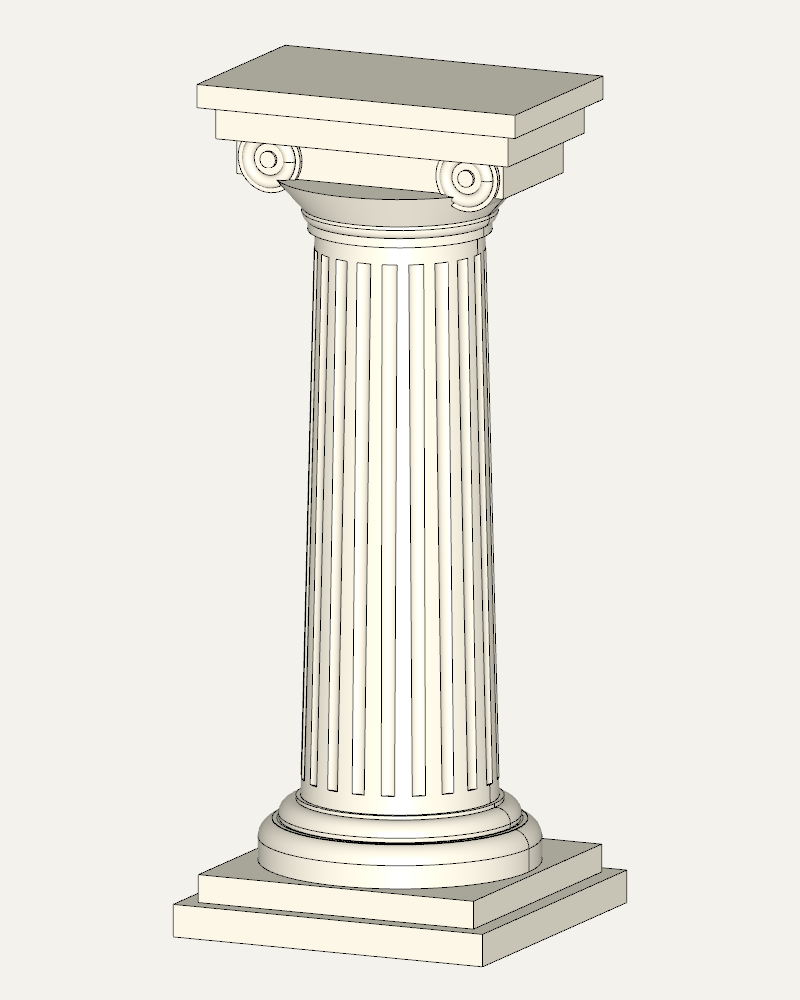
Command for this view:
zencad render antique_column.py -o antique-column.png \
  --yaw -65 --pitch 12 --msaa 8 --size 800x1000 \
  --background "#f4f2ed" --timeout 120