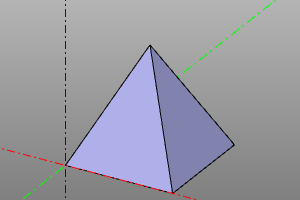
Triangulation and meshes
Functions for working with polygonal representations.
Displaying a mesh
Shape.to_mesh() builds an indexed triangle mesh, MeshData. Pass it directly to disp: the viewer displays the mesh without converting triangles into BREP faces.
model = torus(30, 8) - box(60, 12, 12, center=True)
mesh = model.to_mesh(linear_deflection=0.35)

controller = disp(mesh, color=color.orange)
show()
The default mode is shaded_with_edges: a shaded surface with all triangle edges visible. Choose a mode when displaying the mesh:
disp(mesh, display_mode="shaded_with_edges")  # surface and edges
disp(mesh, display_mode="shaded")             # surface only
disp(mesh, display_mode="wireframe")          # edges only
For an object already displayed, use controller.set_mesh_display_mode(...).
Mesh data
Shape.to_mesh(linear_deflection, angular_deflection=...) returns MeshData. Smaller deflection produces a more detailed mesh; crease_angle sets the angle at which adjacent triangle normals are split to preserve sharp edges.
positions contains vertex coordinates; normals contains normals; triangles contains triples of vertex indices; triangle_face_ids maps triangles to the original shape's faces.
Signature:
mesh = shp.to_mesh(deflection)
nodes, triangles = mesh.positions, mesh.triangles
Example:
m=sphere(10)
mesh = m.to_mesh(0.1)
nodes, triangles = mesh.positions, mesh.triangles

print("count_of_nodes:", len(nodes))
print("count_of_triangles:", len(triangles))

print("first_five_nodes:", nodes[:5])
print("first_five_triangles:", triangles[:5])
NumPy and OCP
The mesh is computed when its data is requested. .value() returns numerical data and counts, .to_numpy() returns NumPy arrays, and .native() returns a Poly_Triangulation for OCP.
import zencad as z

mesh = z.box(10).to_mesh(0.5)
record = mesh.value()
assert record.vertex_count > 0
assert record.triangle_count > 0
arrays = mesh.to_numpy()
assert arrays.positions.shape[1] == 3
native = mesh.native()
Changing the returned arrays does not alter the original shape. A mesh approximates the geometry. STL/3MF export can be called without building the mesh manually.
Polyhedron
A solid made of planar faces, specified by vertex points pnts and tuples of vertex indices defining each face.
Signature:
polyhedron(pnts, faces, shell=False)
Example:
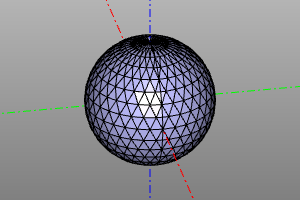
m=sphere(10)
mesh = m.to_mesh(0.1)
nodes, triangles = mesh.positions, mesh.triangles
disp(polyhedron(nodes, triangles))
Convex hull
Builds the convex hull of a point set using scipy.spatial.ConvexHull.
convexhull_ computes the point-index arrays of the hull's polygons. convexhullshape builds the hull using polyhedron.
Options:
incremental and qhulloptions_ are options of scipy.spatial.ConvexHull (see the SciPy documentation).
shell creates a shell instead of a solid.
Signature:
convex_hull(pnts, incremental=False, qhull_options=None)
convex_hull_shape(pnts, shell=False, incremental=False, qhull_options=None)
Example:
pnts = points([
    ( 0,  0,  0),
    (10,  0,  0),
    (10, 10,  0),
    ( 0, 10,  0),
    ( 5,  5, 10),
])

print(convex_hull(pnts))
disp(convex_hull_shape(pnts))